Presets Guide (Exit Strategies)
Automate your exits with presets. Set take-profit and stop-loss rules that automatically sell your positions when price targets are hit.
Before You Start
- What are presets? Pre-configured exit rules that automatically place sell orders when you buy a position.
- Two rule types: Take Profit (sell on gains) and Stop Loss (limit losses).
- Coverage: Each rule specifies what percentage of your position to sell.
- Execution: Take-profit rules place limit orders; stop-loss rules create protective stop orders.
Presets help you lock in profits and limit losses automatically, without watching the market. Set your strategy once and let PolyBot execute it.
How Presets Work
- You create a preset with one or more exit rules.
- After buying a position, you apply the preset (manually or automatically).
- PolyBot places the appropriate orders:
- Take Profit: Limit sell orders at your target prices.
- Stop Loss: Protective orders that trigger if price drops.
- When price hits your targets, shares are sold automatically.
Quick Presets
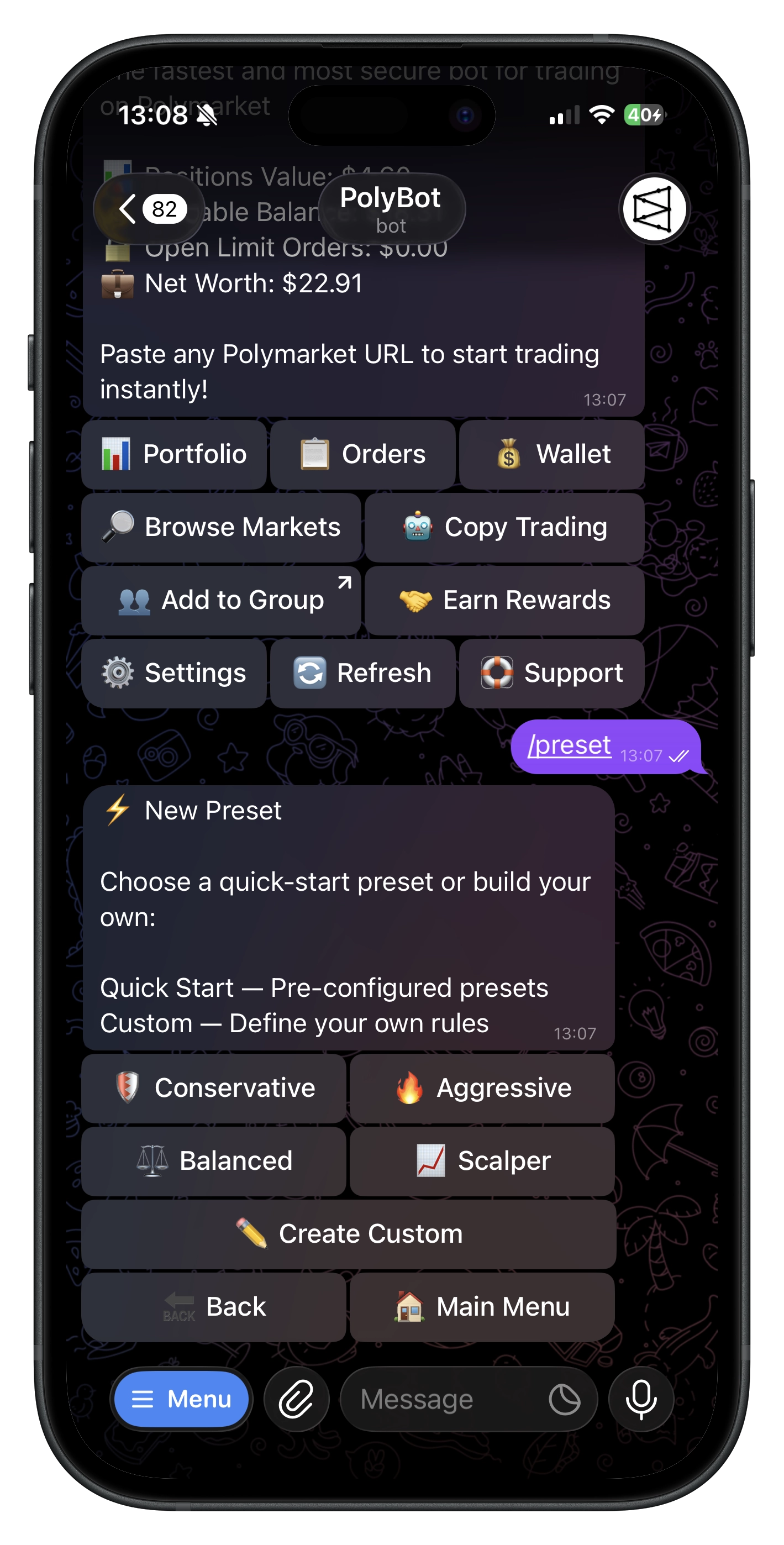
PolyBot offers four pre-built presets for common strategies:
| Preset | Take Profit | Stop Loss | Strategy |
|---|---|---|---|
| 🛡️ Conservative | +30% → Sell 100% | -20% → Sell 100% | Balanced risk/reward |
| 🔥 Aggressive | +50% → Sell 100% | -10% → Sell 100% | High targets, tight stops |
| ⚖️ Balanced | +25% → Sell 50%, +50% → Sell 50% | -15% → Sell 100% | Scale out profits |
| 📈 Scalper | +10% → Sell 100% | -5% → Sell 100% | Quick small gains |
Using a Quick Preset
- Command:
/preset. - Select one of the quick presets.
- Optionally set it as your default.
- Done! Apply it to positions after buying.
Creating Custom Presets
Build your own exit strategy with custom rules.
Step 1: Start Creation
- Command:
/presetor go to Presets → ➕ New Preset. - Choose ✏️ Create Custom.
Step 2: Name Your Preset
Enter a name (e.g., "My Strategy", "Crypto Exits").
Step 3: Add Rules
For each rule, specify:
- Rule Type: Take Profit or Stop Loss
- Trigger %: When to trigger (e.g., +25% for TP, -15% for SL)
- Sell %: How much of your position to sell (25%, 50%, 75%, or 100%)
Take Profit Triggers: +10%, +25%, +50%, +100%, +150%, +200%, +300% (or custom)
Stop Loss Triggers: -5%, -10%, -15%, -20%, -25%, -30% (or custom)
Step 4: Review Coverage
The coverage bar shows how much of your position is allocated:
🔒 Position Coverage:
├ TP: ████████░░ 80%
└ SL: ██████████ 100%
- Each rule type (TP and SL) can total up to 100%.
- You can have multiple TP rules that add up (e.g., 50% at +25%, 50% at +50%).
Step 5: Save
- Tap ✅ Done when finished adding rules.
- Choose whether to set as default.
Understanding Rules
Take Profit Rules
Sell when price increases by a percentage from your entry.
Example: Buy at 50¢, set +20% take profit.
- Target price: 50¢ × 1.20 = 60¢
- When price reaches 60¢, your shares are sold via limit order.
Multiple Take Profit Rules:
📈 Take Profit:
   • At +25% → Sell 50%
   • At +50% → Sell 50%
This scales out — sell half at +25%, remaining half at +50%.
Stop Loss Rules
Sell when price decreases by a percentage from your entry.
Example: Buy at 50¢, set -20% stop loss.
- Trigger price: 50¢ × 0.80 = 40¢
- If price drops to 40¢, your position is sold to limit losses.
Stop loss orders execute at market price when triggered. The actual sell price may differ slightly from the trigger price due to market conditions.
Applying Presets
Manual Application (After Buy)
After completing a market buy, a carousel appears:
- Browse your presets using ⬅️ Prev / Next ➡️.
- Tap 📈 Details to view the rules.
- Tap ✅ Apply to activate the preset.
- Or tap ➡️ Skip to not apply any preset.
Auto-Apply Default Preset
Have your default preset apply automatically to every purchase:
- Go to ⚙️ Settings.
- Enable Auto-Apply Preset.
- Now your default preset applies to all new positions automatically.
Set a default preset and enable auto-apply for hands-free exit management.
Managing Presets
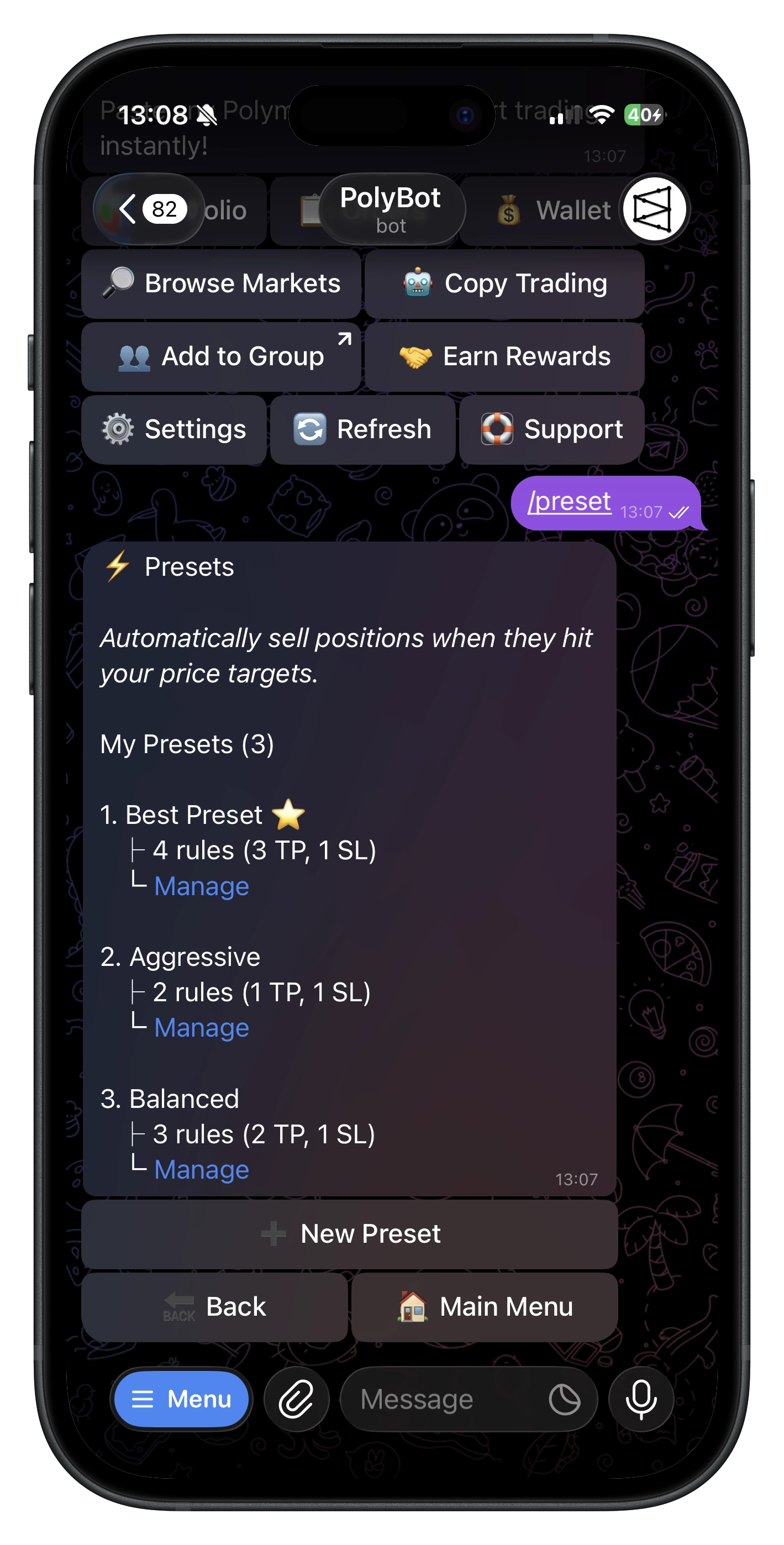
Viewing Your Presets
- Command:
/preset. - See all presets with rule counts.
- Default preset is marked with ⭐.
Editing a Preset
- Open the preset.
- Tap ✏️ Edit Rules.
- Modify, add, or remove rules.
- Changes are saved automatically.
Setting a Default
- Open the preset.
- Tap ⭐ Set as Default.
- This preset will appear first in the carousel and be used for auto-apply.
Renaming a Preset
- Open the preset.
- Tap 🏷️ Rename.
- Enter the new name.
Deleting a Preset
- Open the preset.
- Tap 🗑️ Delete.
- Confirm deletion.
Deleting a preset does not cancel orders that were already placed. Those orders remain active until filled or manually canceled.
Active Presets & Orders
When you apply a preset:
- Take Profit orders are placed as limit sell orders on the Polymarket orderbook.
- Stop Loss orders are created as protective orders monitored by PolyBot.
Viewing Active Orders
- Go to 📈 Limit Orders to see your take-profit limit orders.
- Go to 🛡️ Stop Loss to see your stop-loss orders.
Canceling Applied Presets
If you want to cancel all orders from an applied preset:
- Go to your portfolio position.
- The applied preset is shown.
- Cancel individual orders or the entire preset.
Price Calculations
Take Profit Target Price
Target Price = Entry Price × (1 + Trigger% / 100)
Examples (Entry at 50¢):
| Trigger | Calculation | Target |
|---|---|---|
| +25% | 50 × 1.25 | 62.5¢ |
| +50% | 50 × 1.50 | 75¢ |
| +100% | 50 × 2.00 | 100¢ (invalid*) |
*Prices must be between 1¢ and 99¢. Rules with invalid target prices are skipped.
Stop Loss Trigger Price
Trigger Price = Entry Price × (1 - |Trigger%| / 100)
Examples (Entry at 50¢):
| Trigger | Calculation | Target |
|---|---|---|
| -10% | 50 × 0.90 | 45¢ |
| -20% | 50 × 0.80 | 40¢ |
| -30% | 50 × 0.70 | 35¢ |
Constraints & Limits
| Constraint | Value |
|---|---|
| Max coverage per rule type | 100% |
| Minimum shares per order | 5 shares |
| Valid price range | 1¢ – 99¢ |
| Rules with invalid prices | Automatically skipped |
What Happens with Small Positions?
- If a rule would result in fewer than 5 shares, that order is skipped.
- Example: You hold 8 shares, rule says sell 50% (4 shares) — order is skipped because 4 < 5.
Commands
| Command | What It Does |
|---|---|
/preset | Open presets menu |
Example Strategies
Conservative Long-Term
Good for positions you expect to grow steadily:
Take Profit: +50% → Sell 100%
Stop Loss: -25% → Sell 100%
Scale-Out Strategy
Lock in profits progressively:
Take Profit: +20% → Sell 33%
Take Profit: +40% → Sell 33%
Take Profit: +60% → Sell 34%
Stop Loss: -15% → Sell 100%
Tight Risk Management
For volatile markets:
Take Profit: +15% → Sell 100%
Stop Loss: -10% → Sell 100%
Troubleshooting
- Preset not applying: Ensure you have a position and the preset has valid rules for your entry price.
- Order not placed: Check if calculated shares meet the 5-share minimum.
- Invalid target price: Prices outside 1¢–99¢ are invalid. Adjust your trigger percentage.
- Auto-apply not working: Verify auto-apply is enabled in Settings and you have a default preset set.
- Orders still active after deleting preset: Deleting a preset doesn't cancel existing orders — cancel them manually.
Related Guides
- Stop Loss Guide — Standalone stop-loss orders
- Trading Guide — Manual trading and limit orders
- Portfolio Guide — Managing your positions