PolyBot Wallet Guide
Manage deposits, trading balance (USDC.e), withdrawals, and key export — all inside Telegram.
Overview
- Wallet type: Safe (self‑custodial) on Polygon.
- Trading balance: USDC.e (wrapped USDC on Polygon used by Polymarket).
- Gas: Sponsored by PolyBot's relayer — you do not need MATIC.
Your Wallet
- Get your address from the Main Menu → 💰 Wallet or via
/wallet. - The bot shows your address and USDC.e trading balance.
Deposits
PolyBot supports deposits from multiple blockchain networks via the Polymarket bridge.
How to Deposit
- Open
/wallet→ tap 💵 Deposit. - Select your deposit network:
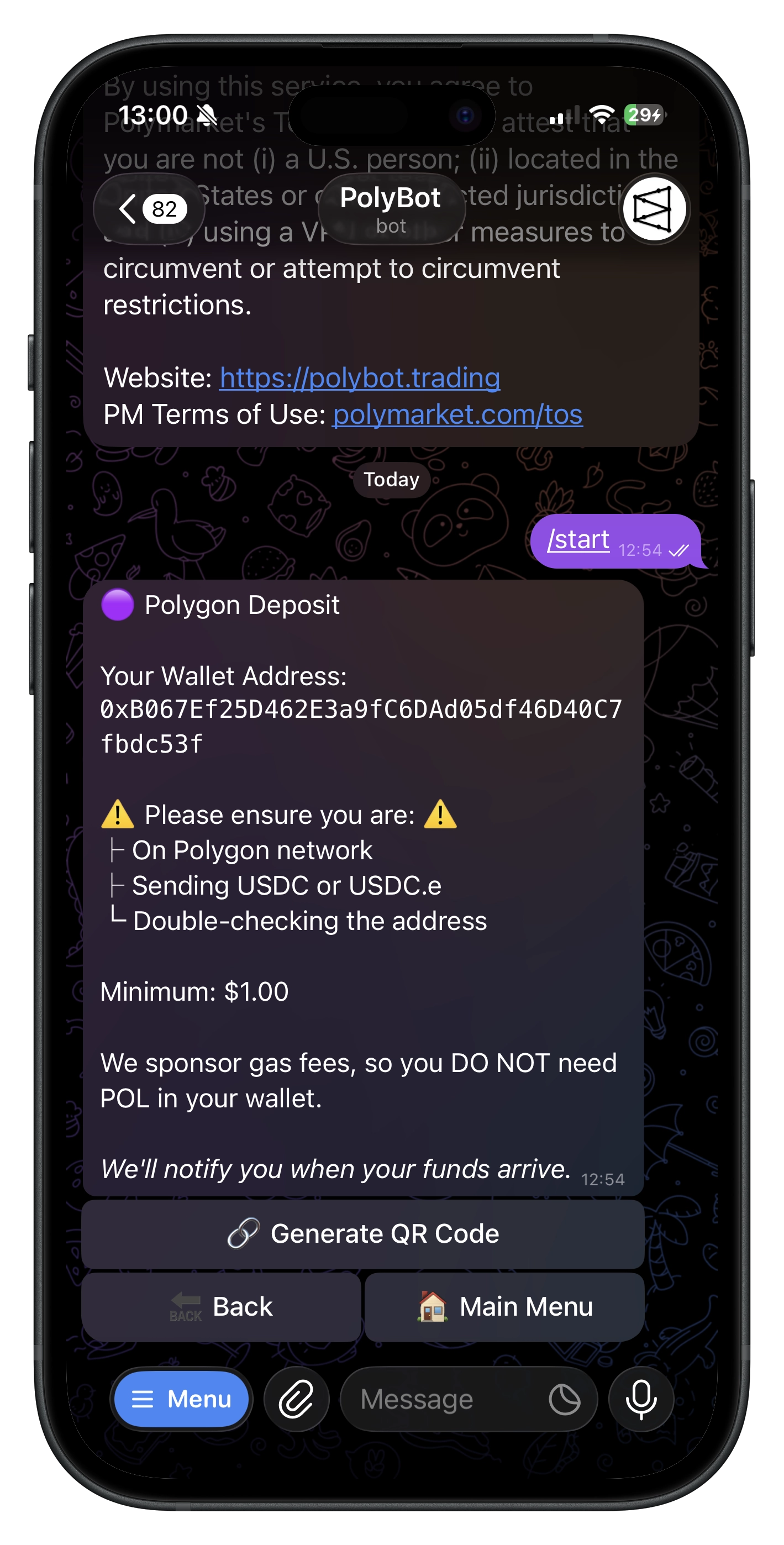
- 🟣 Polygon — Direct deposit (fastest, no bridge fees)
- 💎 Ethereum — Bridges via Polymarket
- 🧬 Solana — Bridges via Polymarket
- 🔶 BNB Smart Chain — Bridges via Polymarket
- 🌀 Base — Bridges via Polymarket
- ₿ Bitcoin — Bridges via Polymarket
- 🦎 HyperEVM — Bridges via Polymarket
- Copy the deposit address or scan the QR code.
- Send supported assets from your wallet.
Supported Assets by Network
| Network | Supported Assets |
|---|---|
| Polygon | USDC, USDC.e |
| Ethereum | ETH, USDC, USDT, WETH |
| Solana | SOL, USDC, USDT |
| BNB Smart Chain | BNB, BUSD, USDT, USDC |
| Base | ETH, USDC, WETH |
| Bitcoin | BTC |
| HyperEVM | ETH, USDC |
All deposited assets are automatically bridged and converted to USDC.e on Polygon for trading.
Polygon Direct Deposits (Recommended)
For the fastest and cheapest deposits, use Polygon directly:
- No bridge fees
- Fastest confirmation times (1–3 minutes)
- If you deposit USDC, PolyBot automatically swaps it to USDC.e in the background via Uniswap v3
Cross-Chain Deposits (Other Networks)
When depositing from other networks:
- Assets are bridged via Polymarket's bridge infrastructure
- Bridge fees may apply (handled by Polymarket)
- Processing time varies by network
- Each asset has a minimum deposit amount (shown in the deposit screen)
Tips
- Polygon direct is recommended for fastest/cheapest deposits.
- Recommended minimum deposit: ≥ $1 for a smooth experience.
- Use Main Menu → 🔄 Refresh (or revisit
/wallet) to see updated balances. - Each network shows minimum deposit amounts in USD.
Trading Balance (USDC.e)
- Your trading balance is always denominated in USDC.e.
- Auto‑swaps run in the background; once complete, your USDC.e balance increases.
- The bot fetches balances live; if a swap was just triggered, allow a minute and refresh.
Withdrawals (USDC.e)
Steps
- Open
/wallet→ tap 💸 Withdraw. - Enter the destination address (0x… on Polygon). The bot validates it and prevents sending to your own address or 0x0.
- If 2FA is enabled, enter your verification code. See 2FA Guide for details.
- Choose an amount (25/50/75/100% or custom), then confirm.
- You'll receive a transaction hash; funds arrive shortly.
Limits & Sponsorship
- Minimum withdrawal (default): $1.00 USDC.e (configurable).
- Maximum withdrawal (default): $50,000 USDC.e.
- Polybot provides full Gas sponsorship.
Troubleshooting
- “Please try again in a few seconds”: a first‑time approval or Safe deployment may be finishing. Retry shortly.
- If a withdrawal fails, verify the address/network and your balance, then try again.
Export Private Key (Advanced)
- Go to ⚙️ Settings → 🔑 Export Private Key.
- The signer key for your Safe is displayed — the message auto-deletes after 60 seconds.
- Store it securely offline. Never share it. Anyone with this key can act on your wallet.
Security & Self‑Custody
- Your funds are in your own Safe; PolyBot only relays approved transactions.
- Sponsored gas and batched pre‑approvals are set up for a fast experience.
- You can always export the signer key and take full control externally.
Commands (Wallet)
/wallet— Open wallet (address, balance, deposit/withdraw)/home— Main Menu/help— Help & FAQs
FAQ
- Which assets can I deposit? You can deposit from multiple networks: USDC/USDC.e on Polygon, ETH/USDC/USDT/WETH on Ethereum, SOL/USDC/USDT on Solana, BNB/BUSD/USDT/USDC on BSC, ETH/USDC/WETH on Base, BTC on Bitcoin, and ETH/USDC on HyperEVM. All assets are converted to USDC.e for trading.
- Which network should I use? Polygon direct is recommended for fastest and cheapest deposits. Other networks use the Polymarket bridge and may have bridge fees.
- Why does my USDC.e balance increase later? A background swap or bridge transfer may have just completed.
- Do I need MATIC? No — gas is sponsored by the bot's relayer.
- Can I withdraw USDC instead of USDC.e? Withdrawals are made in USDC.e on Polygon.
- Can I withdraw to other networks? Withdrawals are only supported to Polygon addresses.